
Effect formulas
#Overview
The effects of events and actions each have an input field for the effect value. You can enter fixed numbers there, but also formulas that are only evaluated during the simulation.
An effect formula always starts with an operation (+, - or =). It is followed by a value: a plain number or a calculation with variables, references and functions. The notation is the same as in the formula field.
The example screenshots on this page come from an older, German version of simcision. Input still works the same way.
#Operation
| +10 | Add ten points |
|---|---|
| -10 | Subtract ten points |
| =10 | Set the status of the affected element to 10 |
#Variables
Predefined variables make the effect depend on the current state of the simulation. Type $ in the input field to see a selection of available variables.
| $Status | Current status of the affected element (value between 0 and 100) |
|---|---|
| $Maximum Status | Maximum status of the affected element. 100 by default. |
| $Minimum Status | Minimum status of the affected element. 0 by default. |
| $Current Round | Number of the current round (1 in round 1, 2 in round 2, etc.) |
More variables, such as mathematical constants like $π, are available in the selection of the formula field.
Example
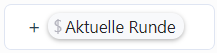
The affected element is influenced differently depending on the round in which the effect occurs: +1 in round 1, +10 in round 10.
#References
You can include the value of other elements in the effect. Type @ to reference another element and pick it from the selection.
Example

The status of the affected element is reduced by the value of the “Wasserablauf” (water drainage) element in the round in which the effect occurs.
#Calculations
Values can be combined in calculations. The characters +, -, *, /, ^ and parentheses are available.
Example

The affected element is influenced in inverse proportion to its current status: it receives +20 if its status is 0, but +0 if its status is 100.
#Functions
Functions produce values that simple calculations cannot, such as random numbers, rounding or case distinctions with #if(… then … else …). Type # to open the selection of available functions.
The complete list with examples is under All available functions.
Example

A random number between 2 and 15 (both included) is added to the affected element. More about chance in simulations: Random numbers and seed.